
Claude Code, not Code
Here's what I've used Claude Code for this month:
- Pulled down emails and extracted key information from them
- Researched candidates for a job posting, ranked them, drafted personalized follow-up emails
- Built a grocery list from a meal plan, compared prices across stores, added items to cart and scheduled delivery
- Feeding it scopes and invoices and then pointed it at source repos to see what our progress is
- Generated daily infographics for social media with my health stats
- Wrote and scheduled newsletters based on research reports
- Extracted bloodwork data from a web app that wouldn't export
- Planned a 5-hour meal prep session across two ovens, a slow cooker, and an air fryer
None of that is coding, I asked for what I wanted and it made it happen. In the past I would either a) not do it, b) do these things manually and poorly or c) wrote an annoying little script to do it. And it's possible that Claude actually wrote some code along the way—a bash script here, some JSON there—but I don't know and I don't care. I described what I wanted in plain English and Claude figured out how to make it happen.
It's called Claude Code. I use it for everything except code.
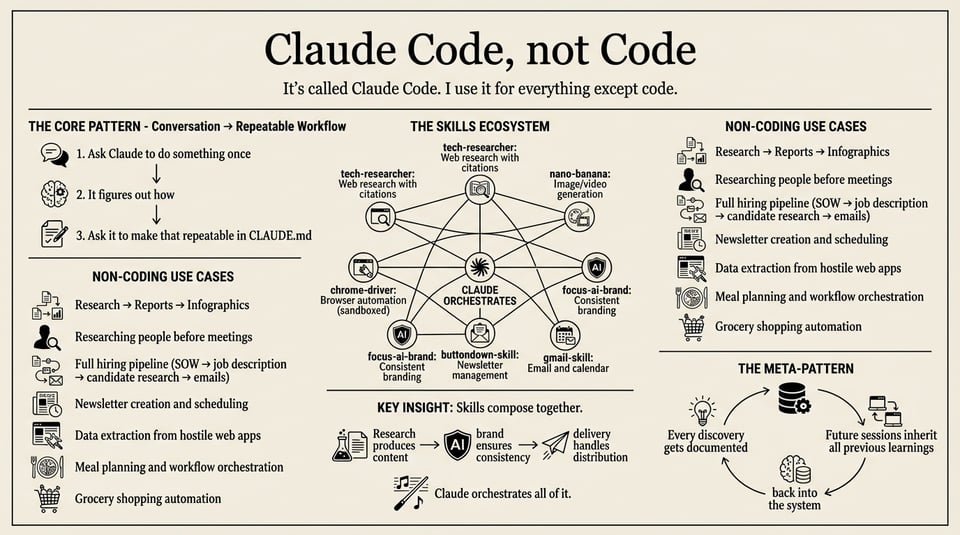
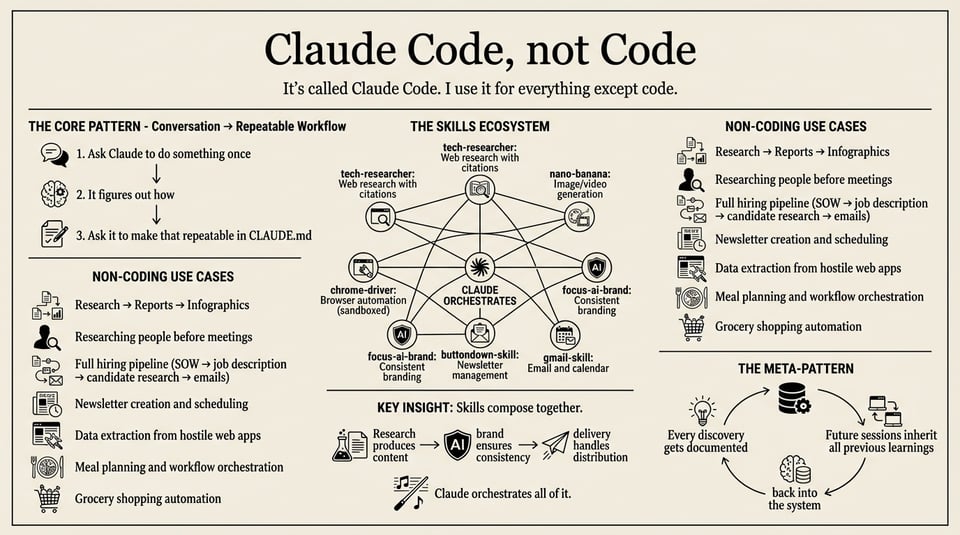
The Core Pattern: Conversation → Repeatable Workflow
The magic happens when you turn ad-hoc requests into documented workflows. You can store this in CLAUDE.md (which every session gets access to) or another file that you reference, like review-applications.md. I was fasting, and I wanted something to bring in all my information in one place so I could track it. This is how it happened:
Here's the loop:
- Ask Claude to do something once - "Get me my Oura sleep data"
- It figures out how - Writes a script, calls an API, whatever
- Ask it to make that repeatable - "Now add instructions to CLAUDE.md so you can do this every morning when I give you my weight"
By the end of my fast, CLAUDE.md was 300+ lines of structured instructions:
# Fasting Tracker - Claude Instructions

## Daily Update Workflow
When the user provides their morning weight (e.g., "my weight is 90.7"):
1. Run `./track.sh` to sync Oura data
2. Update weight in data.json
3. Add daily log entry
4. Generate infographic for social media
Each morning I'd say "my weight is 90.7" and Claude knew exactly what to do. No re-explaining. The project had taught Claude how to work on it.
And "Get me my Oura sleep data"? That went off and searched the web, figured out how to call the api, gave me instructions on how to setup the oura access token, and boom just did it. (I did end up asking it to make changes to that script over time, but you get the idea.)
The key insight: Don't just ask Claude to do things. Ask it to document how it did them so it can do them again.
The Skills Ecosystem
Claude Code becomes powerful when you add skills—plugins that extend what it can do. Here's the stack I use for non-coding work:
| Skill | What it does |
|---|---|
| tech-researcher | Web research with 10+ sources, produces academic-style reports with citations |
| nano-banana | Image and video generation via Google Gemini |
| chrome-driver | Browser automation with session isolation |
| focus-ai-brand | Applies consistent brand guidelines to any output |
| buttondown-skill | Newsletter drafts, scheduling, and analytics |
| gmail-skill | Reading and sending emails, scheduling calendar events |
These skills talk to each other. Research produces a report → the report feeds an infographic prompt → nano-banana generates the image → focus-ai-brand ensures it matches your visual identity. Or: research a topic → draft a newsletter about it → schedule it for Friday.
Installing skills is just pointing Claude at a GitHub repo. No package managers, no npm—it figures out the structure and loads what it needs.
These are all available at https://github.com/The-Focus-AI/claude-marketplace
Research → Reports → Infographics
I wanted reference materials about what happens during extended fasting—the metabolic phases, mental changes, refeeding protocols. The research skill produced three outputs:
- Research report - A markdown document with findings and source citations
- Structured summary - Key points organized for reference
- Infographic prompt - A detailed prompt for image generation
The research report is the part people miss. When Claude does web research, it can produce a proper report with references:
## Metabolic Phases of Extended Fasting

### Glycogen Depletion (Days 1-2)
The body first depletes liver glycogen stores, typically exhausted
within 24-48 hours [1]. Blood glucose drops, triggering gluconeogenesis.

### Ketosis (Days 2-4)
Ketone bodies (beta-hydroxybutyrate, acetoacetate) become the primary
fuel source for the brain [2]. Many report mental clarity during this phase.

...

## References
[1] Cahill GF Jr. "Fuel metabolism in starvation." Annu Rev Nutr. 2006
[2] Owen OE, et al. "Brain metabolism during fasting." J Clin Invest. 1967
Then Claude synthesizes this into an infographic prompt and uses image generation (I use nano-banana, which wraps Gemini) to create the visual. The research backs up what's in the image.
I ended up with a library of reference infographics—metabolic changes day by day, mental/emotional journey, the fast-refeed-fast cycle protocol, a 7-day refeeding meal plan. These are evergreen reference materials. Here's one about refeeding:
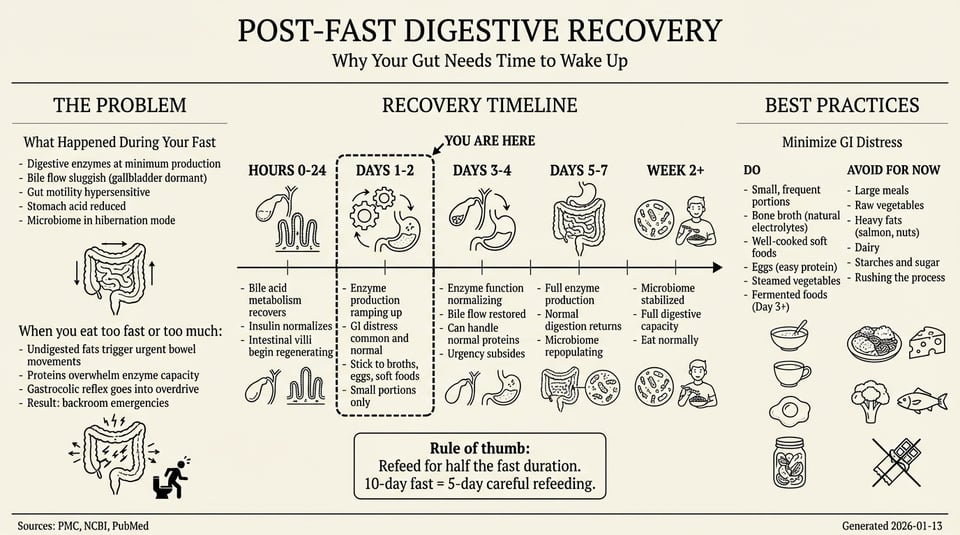
Style guidance matters. Without explicit instructions like "NO neon colors, NO glowing effects," AI image generators default to garish tech-startup aesthetics. My template prompt:
Create a 16:9 landscape infographic for Day {N} of a 10-day water fast.
Use Edward Tufte-inspired design: cream/off-white background, black text,
thin hairline rules, serif font (Times/Georgia style), NO neon colors,
NO glowing effects, NO gradients. Scientific paper figure aesthetic.
Specifying "Edward Tufte-inspired" and "scientific paper figure" got clean, readable results. I also generated daily infographics with my actual stats—each morning: update weight → sync data → generate infographic. Ten days, ten infographics documenting the journey.
Researching People and Hiring
Before a sales call, meeting, or evaluating a job candidate, I have Claude research the person:
Research [Name] at [Company]. What's their background? What has the company announced recently? What might they care about?
The research skill goes deep—LinkedIn, press releases, blog posts, podcast appearances, conference talks. It produces a briefing doc with career trajectory, recent news, topics they've written about, potential conversation hooks, and source links for everything.
For developers, it goes to GitHub and actually pulls down the code. One example: I was hiring for a front-end developer role, and Claude said a candidate wasn't a good fit even though on first glance it made sense. I said "are you sure?" and it responded that even though the repositories looked front-end heavy, if you actually looked at the code it turned out the person was more of a Python ML developer and most of the front end was just Streamlit. Probably not a good fit for this role.
That research pattern scales to sales calls, hiring, understanding competitors—any situation where you need to quickly understand a person or organization.
The full hiring pipeline:
I'm just throwing everything at Claude by the way, and seeing what works. Frankly quite a lot of it does. For a recent project hire, Claude handled most of the process:
-
Job description - Claude looked at the SOW to understand the project scope, then read through the git repo—code patterns, open issues, tech stack. From that, it figured out what skills we actually needed (not just what I thought we needed) and wrote the job description.
-
Candidate evaluation - When applications came in, I'd drop the candidate's email into Claude. It researches them, looks at their actual code, and ranks them against the job requirements with specific reasoning.
-
Follow-up emails - Based on the evaluation, Claude drafts the appropriate response: strong fit gets a call scheduled with specific things from their background mentioned, maybes get requests for more information, and rejections get polite declines with genuine reasons.
I review and send, but the drafts are usually 90% there. The personalization is real because it's based on actual research, not templates.
The whole pipeline: SOW → code analysis → job description → candidate research → ranking → personalized emails. Claude orchestrates all of it, and I make the final calls.
Sending Newsletters
The buttondown-skill connects Claude to my newsletter platform. The workflow:
- Draft from research - "Write a newsletter about [topic], based on what we learned from that research report"
- Review in Claude - Edit the draft conversationally ("make the intro punchier", "add a section about X")
- Then hand rewrite everything because "its not this it's that"
- Schedule - "Schedule this for Friday at 9am"
I can also ask "show me analytics for the last 5 newsletters" and get open rates, click patterns, what's resonating.
The key is the handoff between skills. Research produces the content. The brand skill ensures consistent voice and formatting. Buttondown handles delivery. Claude orchestrates all of it.
Extracting Data from Hostile Sources
I had bloodwork results from Function Health, but they were locked in a complex React web app with no export option. Classic.
The trick: "Save Page As" in Chrome. This creates a massive HTML file (mine was 696KB) with all the embedded JavaScript and CSS. It's a mess, but all the data is in there somewhere.
Claude read through the garbage and extracted what mattered:
## Areas of Concern

| Marker | Value | Status | Notes |
|--------|-------|--------|-------|
| Apolipoprotein B (ApoB) | 153 mg/dL | **Above Range** | Cardiovascular risk |
| LDL Cholesterol | 188 mg/dL | **Above Range** | |
| Triglycerides | 157 mg/dL | **Above Range** | |
| Glucose (fasting) | 102 mg/dL | **Above Range** | Borderline pre-diabetic |
This connected my fasting goals to actual health markers. Visceral fat reduction should improve these metabolic numbers. Now I have clean data I can track over time.
This pattern works for any app that won't export: health dashboards, financial statements, analytics tools. Save the page -- or even screenshot -- and let Claude extract the structure.
Meal Planning as Workflow Orchestration
Breaking a fast requires careful refeeding. Claude helped design a 7-day meal plan, but the interesting part was the cooking system.
I have two ovens, a slow cooker, an air fryer, and limited time. Claude created a time-boxed Sunday meal prep workflow:
{
  "overview": {
    "total_time": "4.75 hours (12:00pm - 4:45pm)",
    "equipment": {
      "oven1": "Pork braise at 300°F",
      "oven2": "Chicken, then vegetables at 400°F",
      "slow_cooker": "Beef stew on HIGH",
      "air_fryer": "Bacon"
    }
  },
  "steps": [
    {
      "time": "12:00",
      "title": "START - Big Proteins Go In",
      "do": ["Preheat OVEN #1 to 300°F", "Season pork, into dutch oven", "Beef into slow cooker"],
      "status_after": "Pork braising, Beef cooking, Chicken prepped"
    }
  ]
}
Every 15-30 minutes there's a step. It tells you exactly which appliance to use and what should be running. The result: 5 proteins and all sides prepped in under 5 hours.
This isn't code—it's orchestration documentation. Claude turns "I need to meal prep for the week" into a time-boxed workflow you can actually execute.
Browser Automation with Session Isolation
I was going to try one of these AI browsers and it asks me to log into email and whatever else and I'm like "NO WAY" and I deleted it. Maybe they are great but I don't trust these things at all. But writing chrome-driver I realized that it's fairly easy to specify a different context for each of the sessions, so that you can limit access to just the specific service you are interested in. In other words: sandboxing.
The chrome-driver plugin lets Claude control a browser. The security pattern:
--user-data=/Users/me/.chrome-instacart
Each service gets its own cookie universe. Claude can log into Instacart and manage my cart, but it has NO access to my main Chrome profile—no banking, no email, nothing.
I had Claude build two grocery carts at different stores from my meal plan. Market 32: $317. Stop & Shop: $361. Same olive oil was $46 at one store, $10 at the other. Claude spotted it and swapped.
The session persists between runs (stays logged in), and you can watch what it's doing (--no-headless). It's browser automation without the security nightmare.
The Meta-Pattern
The most powerful insight isn't any single feature. It's that every discovery gets documented back into the system.
- Learned how to sync Oura data? It goes in CLAUDE.md
- Figured out Instacart's button patterns? Document them
- Found a good infographic style? Save the template prompt
Future sessions inherit all previous learnings. The project teaches Claude how to work on it.
When This Works
- Research and briefings - People, companies, topics—with citations
- Hiring pipelines - Job descriptions, candidate evaluation, follow-up emails
- Content pipelines - Research → draft → newsletter → schedule
- Personal dashboards - Health, finances, habits
- Data extraction - Pulling structure from hostile web apps
- Browser automation - Shopping, form filling, data entry
- Workflow orchestration - Meal prep, project plans, schedules
When It Doesn't
- Real-time interaction - Claude works in request/response cycles
- High-stakes decisions - Don't automate financial transactions
- 100% reliability needs - Browser automation can be flaky
AI IN THE COMPUTER
Claude Code isn't just for writing software. It's for orchestrating capabilities.
The fasting tracker started as "help me track my weight" and ended up with API integrations, research reports, infographics, meal planning, and automated grocery shopping. Each piece built on the last, with Claude remembering context and patterns across sessions.
The skills make it modular. Need research? There's a skill. Need images? There's a skill. Need to send a newsletter or automate a browser? Skills. They compose together, and Claude figures out how to chain them.
The conversation-to-workflow loop is the key. Don't just ask Claude to do things. Ask it to teach itself how to do them again. And when you find yourself doing something repeatedly, there's probably a skill for that—or you can build one.


